



Google has unveiled new features in Android 16, focusing on enhancing communication and usability. Key upgrades include Expressive Live Captions, which add emotional context to transcriptions and an urgent call tagging feature in beta to indicate important calls.
US-based tech giant Google has announced fresh set of Android 16 features, the latest update packs several improvements that aim to make communication clearer, browsing smoother and everyday phone usage a lot more intuitive. Most of the changes arrive through core Google apps including Gboard, Phone, Chrome and Messages, while one major upgrade still remains in its beta phase. Here’s a complete look at what’s rolling out.

Android 16 brings Expressive Live Captions
One of the most interesting additions comes in the form of Expressive Captions, which not only transcribe spoken words but also add emotional cues and ambient sound labels. Instead of plain text, captions can now describe cheering sounds, applause, or even emotional tone such as joyful or sad. Google says this is designed to help users understand context when watching videos silently, especially on short-form content or livestreams where audio cues play a big role.
“Urgent” Call tagging Enters Beta
Another notable feature being tested is the new urgent call flag. When making a call from the Phone app, users can tag it as urgent, which will then appear on the recipient’s incoming call screen. If the call goes unanswered, the urgent label stays in the call history, making it clear that the caller needed immediate attention. Google highlights that this could be particularly useful in time-sensitive situations, such as access issues or emergencies.

Safer And Easier Group Chat Controls
Google Messages is also getting smarter in handling unwanted group chats. When someone is added to a group by an unknown number, Android will now show a detailed warning with group information and built-in action buttons. Users can leave the group instantly, block the sender, or report the chat as spam without any extra steps. This aims to reduce confusion and make group safety tools more accessible.
Scam Detection Via Circle To Search
With Android 16, Google is blending AI into day-to-day security. Circle to Search now includes scam-checking capabilities. If a message or screenshot looks suspicious, circling it will generate an AI overview summarising whether it resembles known scams and what actions you should consider next. The idea is to give users an instant reference without needing to leave the screen or search manually.
Tab Pinning For Chrome Mobile
Chrome for Android will finally allow users to pin tabs, much like the desktop version. Pinned tabs stay fixed in the tab bar, allowing quick access even after closing the browser. This helps users keep important pages handy, especially for ongoing research, work, or shopping.
New Emoji Kitchen Mixes
Gboard’s popular Emoji Kitchen is expanding with more creative sticker combinations. Users will be able to mix emojis to create expressive, shareable stickers across messaging apps that support Gboard.
Supported Devices And Rollout
New Features in Android 16 QPR2
| Feature Category | New Features / Improvements | Details / Notes |
|---|---|---|
| Security & Privacy | Enhanced Security Patch | Latest security fixes to protect user data. |
| System Performance | Faster App Launch | Apps open quicker with optimized background processes. |
| Battery & Power | Adaptive Battery Improvements | Better battery management for long-lasting usage. |
| User Interface (UI) | Refreshed Quick Settings | Easier access to Wi-Fi, Bluetooth, and notifications. |
| Camera & Multimedia | Improved Camera Algorithms | Better low-light shots and faster image processing. |
| Connectivity | Better 5G & Wi-Fi Stability | Enhanced network connectivity and reliability. |
| Accessibility | Voice Access & Magnification Updates | Improved navigation for users with accessibility needs. |
| Bug Fixes | General System Stability | Fixes for known crashes, freezes, and app errors. |


The Android 16 QPR2 update is now rolling out to compatible Pixel devices, including the Pixel 6 series, 7 series, 8 series, 9 lineup, Pixel Fold models, Pixel Tablet and the Pixel 10 series, as noted by 9to5Google.
How To Install Android 16 QPR2
Users can check for the update by heading to Settings, selecting System, then System update. Devices running Android 16 QPR2 Beta 3.3 will receive a minor patch. Those on the beta program who want to switch to stable builds will need to opt out, although their device will not be factory-reset once the stable OTA becomes available.
Get Latest News live on Times Now along with Breaking News and Top Headlines from Technology Science and around the world.
Pixel phones get newer AI smarts and more personalized
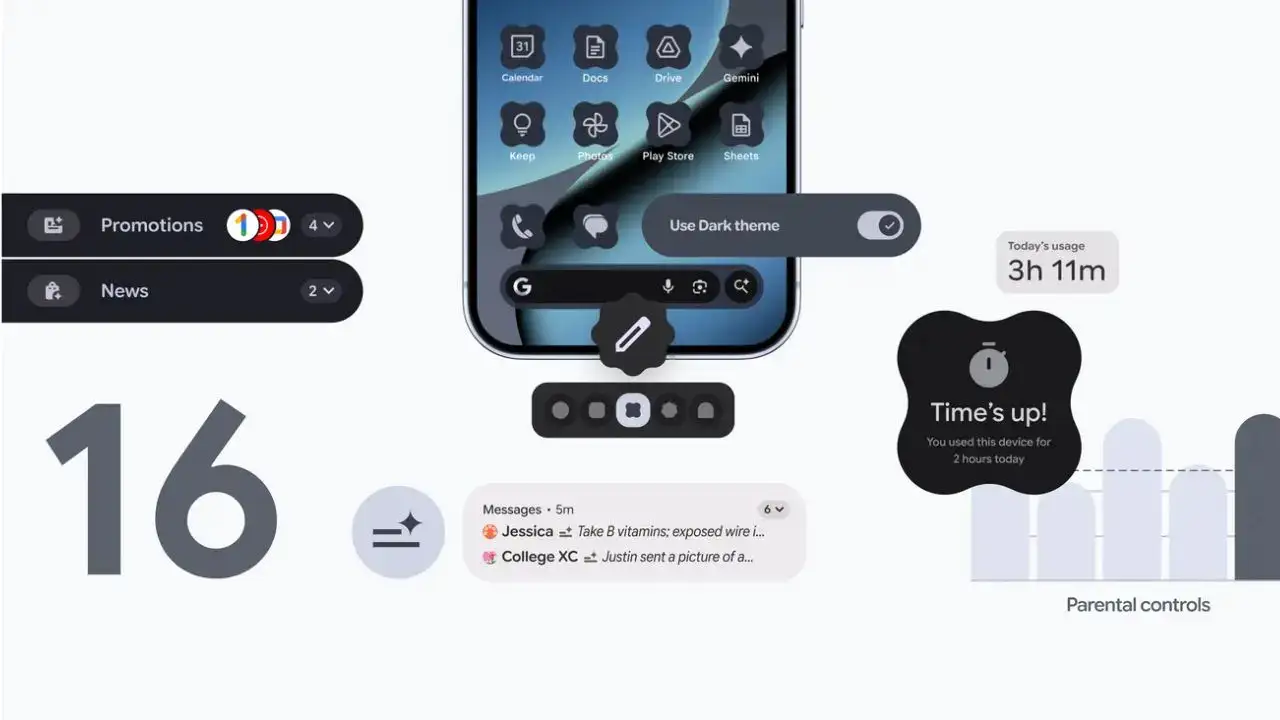
The headline feature is AI notification summaries that condense lengthy group chats and message threads into digestible overviews. Instead of scrolling through dozens of messages, your phone will now present quick summaries you can scan at a glance. There’s also a notification organizer that automatically bundles and silences lower-priority items like promotional emails and social media alerts, helping you maintain focus on what genuinely requires your attention.Customization takes center stage in this update. Android 16 introduces custom icon shapes for your home screen and automatically applies themed icons across all your apps for a more cohesive aesthetic. The expanded dark theme is particularly noteworthy—it now darkens apps that don’t natively support dark mode, which should reduce eye strain and potentially extend battery life.Parents get meaningful improvements too, with a dedicated control center built directly into Android Settings.

The feature allows setting daily screen time limits, scheduling downtime for bedtime, and managing app access—all protected by a PIN and controllable from the child’s device itself.Another addition is the ability to flag important calls as “urgent” through the Phone app, ensuring time-sensitive calls don’t get ignored when you really need someone to pick up.
New Android 16 features that’ll work across the Android phones
Google isn’t limiting improvements to Android 16 alone. Several features are rolling out to all supported Android devices, including a new “urgent” call flag in the Phone app that signals to contacts when you genuinely need them to pick up. Circle to Search has been enhanced to help identify scams by analyzing suspicious messages and offering AI-generated guidance on next steps.Chrome for Android finally gains pinned tabs, Google Messages will alert you about questionable group chat invites with one-tap blocking options, and Expressive Captions now displays emotion tags like “[joyful]” or “[sad]” when watching videos with the sound off.
Why the new Android release schedule matters
The bigger story here is Google’s departure from its traditional annual update cycle. By splitting releases into more frequent updates, third-party Android manufacturers like Samsung have more time to adapt their customizations. This should significantly narrow the gap between when Pixel users receive new features and when other Android phones get them—addressing a long-standing pain point in the Android ecosystem.The new features begin rolling out to Pixel devices immediately, with wider Android availability coming in the following weeks. Non-Pixel phones will receive Android 16 according to their manufacturers’ timelines.
The information provided in this article is for general informational purposes only. Compatibility, features, and availability may vary depending on device, region, and carrier. Users should follow official instructions from Google and device manufacturers when downloading or installing updates.
#Android16 #QPR2Update #AndroidUpdate #TechNews #MobileUpdate #Carrerbook #Anslation #AndroidDevices #NewFeatures #AndroidTips #SmartphoneUpdate #TechTrends




Leave a Reply